Why I built my own server monitor, and how long it took
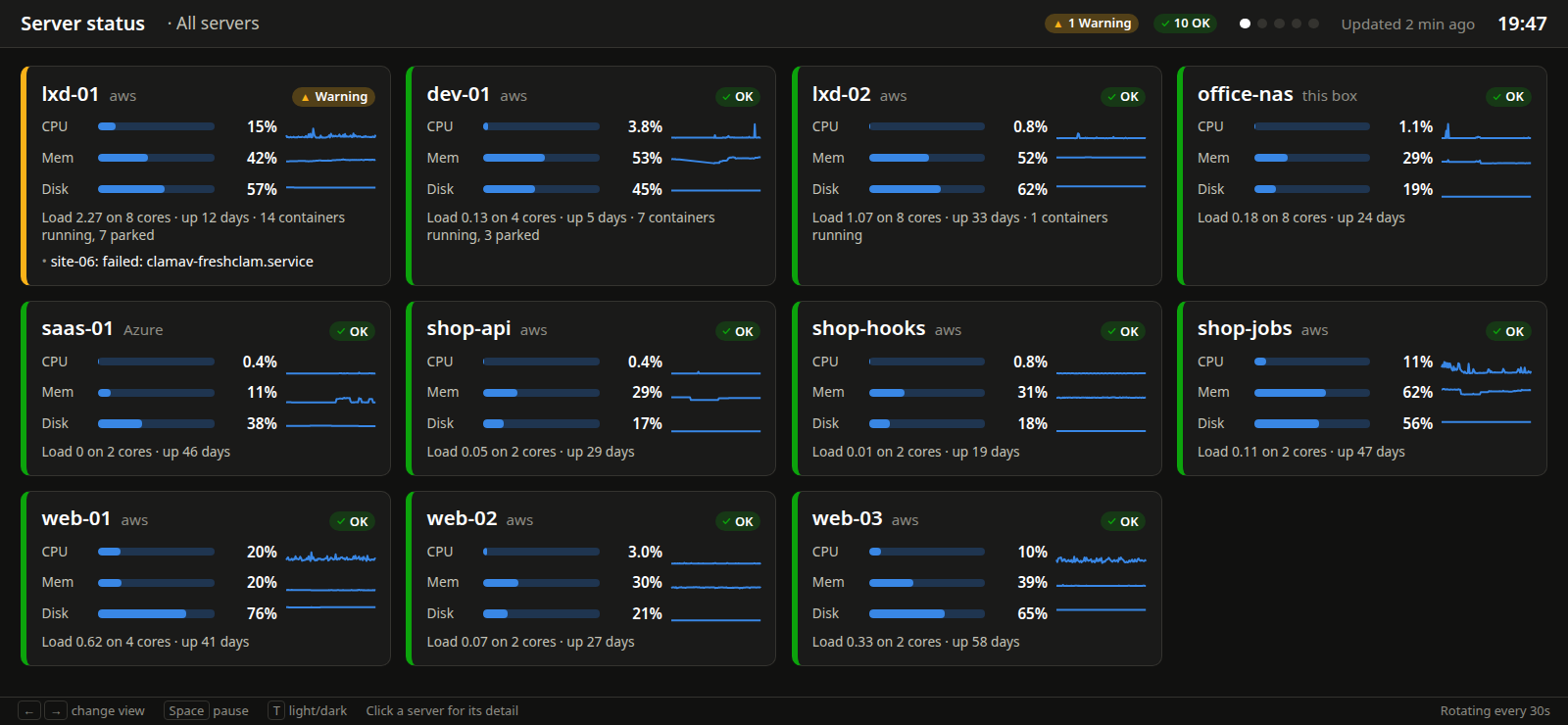
There's a screen on the office wall that shows every server I look after: how busy it is, how full it is, and whether anything has gone wrong in the last five minutes. I built it myself. With AI agents doing the typing, it took about 15 minutes.
Here's why I didn't just install something off the shelf, what it does, and the one part that actually needed thought: making sure a monitor can't become a way in.
What it shows
About a dozen servers. Most are on AWS, one is on Azure, a few run LXD containers (lots of small, separate systems sharing one machine), and one is the office box itself. They run a real mix of Linux versions, old and new.
Each tile shows CPU, memory and disk, with a line for the last 24 hours, plus load, uptime, and whether a reboot is waiting for an update. Green, amber or red. A disk goes amber at 80% full and red at 90%.
It also reads each server's system log every five minutes for the things that genuinely matter: something killed for running out of memory, disk errors, a filesystem going read-only, a database falling over. Any of those turns the tile red for an hour, so I see it even if I wasn't looking at that moment.
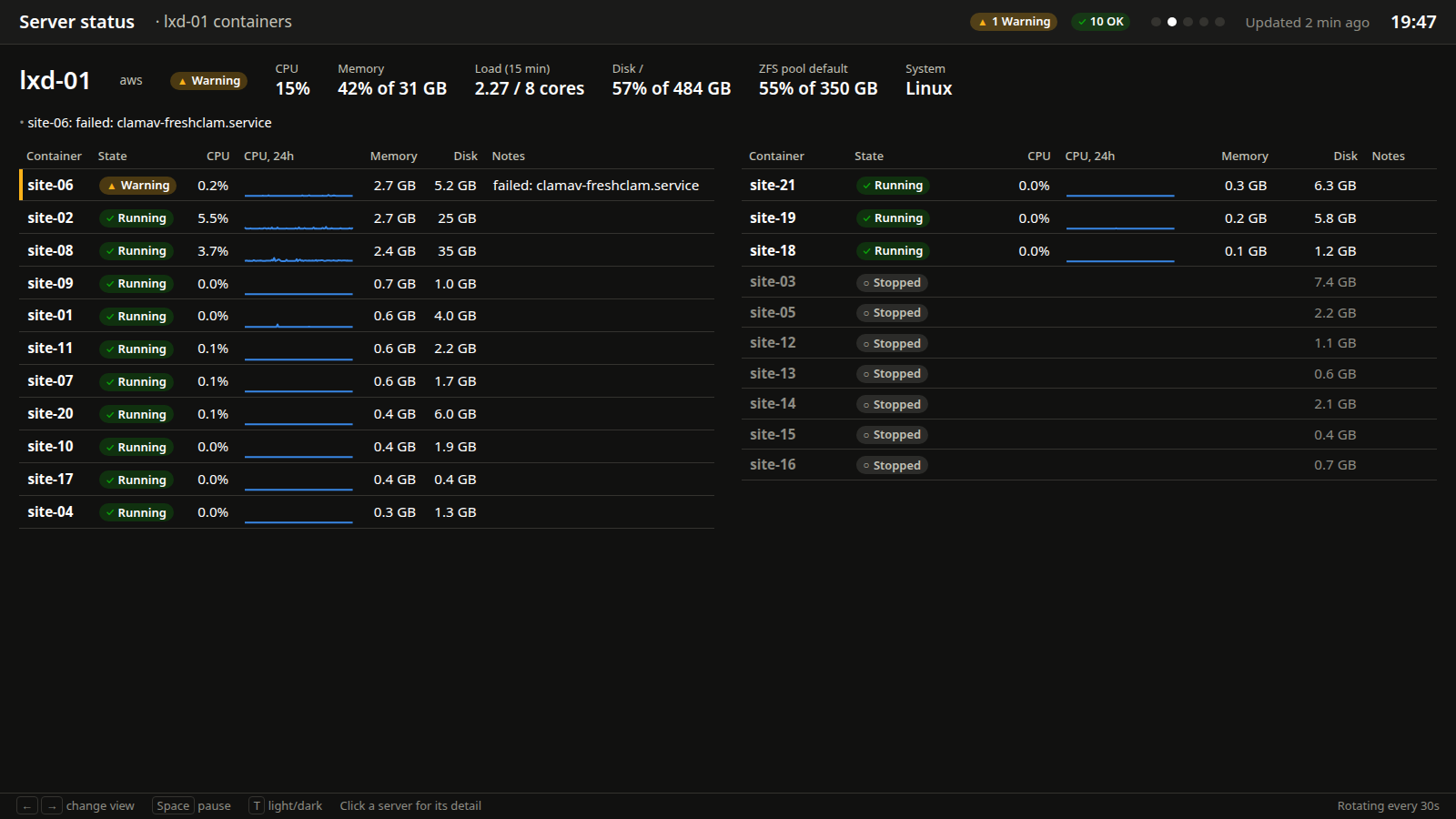
Click a server that runs containers and you get each one on its own: running or stopped, CPU, memory, disk, and any service that has failed. Containers that are meant to be switched off are marked as parked, so they don't cry wolf.
Why not use something off the shelf
There are good open-source tools for this, and for most people I'd point them at one of those first.
- Uptime Kuma checks whether your websites and services are answering, and tells you when they stop.
- Netdata gives you a huge amount of live detail about each server.
- Prometheus with Grafana does more or less everything, if you have the time to set it up and look after it.
My problem was the mix. Different clouds, different Linux versions, containers inside servers, and a couple of machines old enough to be fussy about what you install on them. Most of the tools above want an agent installed on every server, a database, or both. That's more moving parts to keep updated than the thing I was trying to watch.
What I actually wanted was one screen, the dozen numbers I look at every day, and alerts tuned to what's normal for each box.
So that's what it is. A PHP script on the office box, a 60-line script on each server, and one web page. About 870 lines in total. No database, no agent, nothing extra to install or keep updated. Every five minutes it asks every server at once, and the slowest one answers in under ten seconds.
The part that needed thought
A monitor has to log in to every server you own. That makes it a target. If someone got hold of its key, what could they do with it?
Here, almost nothing.
- Each server has its own
monitoraccount, with no password and no way to log in and type commands. - Its key only works from the office's internet address, and it's locked to running one command. Whatever you ask for, that one command is what you get.
- That command is a read-only script owned by the system. The account is allowed to run that one script as an administrator, with no options, and nothing else.
- The file holding the key is owned by the system too, so the account can't loosen its own rules.
- The script reads figures the server already keeps. It doesn't change anything.
Worst case, someone who has stolen the key and is sitting in my office gets a status report.
Where the AI came in
I made the decisions and the agents wrote the code. That's the 15 minutes: the collector, the script that runs on each server, the wall page, and the installer that sets up the restricted account on each machine.
The installer is the bit I'm quietly pleased with. It checks the server's SSH settings won't lock the new account out before it changes anything, checks the permissions file is valid before putting it in place, keeps a copy of anything it replaces, and copes with older servers that need things done slightly differently.
What to measure, what counts as a problem, and how locked down the access should be came from me, from 25 years of looking after servers. That's the part an AI wouldn't have chosen on its own. Left to itself, the easy answer is to log in as an administrator and run whatever it likes. That works perfectly, and it's exactly what you shouldn't do.
That's how we build at Dev Partners now. The building is fast. Knowing what to build, and what to refuse, is still the job.
Should you build your own?
Honestly, probably not. If you have one or two servers, Uptime Kuma plus the graphs your hosting company already gives you will cover most of it, for free.
Build your own when the off-the-shelf tools have to be bent too far to fit, and you know exactly what you want to see on the screen. Then it's a very short job.
Want someone else watching?
If you'd rather not have a screen on your wall at all, that's what support retainers are for. I keep an eye on your servers, catch problems early, and tell you about them in plain English.
Want someone watching your servers?
Monthly care for your servers: updates, monitoring, fixes and someone to ask. No long contract.